Best Laravel Packages You Should Use in Your Project
Laravel’s rich ecosystem isn’t just about the core framework — it’s also about the thousands of packages that extend functionality, speed up development, and solve common problems with elegant reusable tools. Laravel Package Ocean aggregates hundreds of packages across categories like debugging, APIs, UI components, security, mail, utilities, and more, making it easy to find the right tools for your next project.
In this post, we’ll highlight some of the most useful, popular, and practical Laravel packages you can start using today — whether you’re building small applications or enterprise-grade platforms.
1. Laravel Debugbar — Supercharge Your Debugging
Package: barryvdh/laravel-debugbar
Laravel Debugbar adds a developer toolbar to your application with detailed performance insights — including database queries, route timing, caching, memory usage, and request data. It’s one of the highest-starred community packages on GitHub and indispensable during development.
Best for: Performance tuning, tracking SQL queries, spotting bottlenecks early.
Managing user permissions and roles manually can be messy. This package offers an elegant API for assigning roles and permissions directly to users, and integrates with middleware and Blade directives for easy policy enforcement.
Best for: SaaS platforms, admin panels, and any app with complex user access control.
composer require spatie/laravel-permission
3. Laravel Excel — Import & Export Made Simple
Package: maatwebsite/excel
Need to import large Excel or CSV files or export reports from your app? Laravel Excel makes it simple with an intuitive API built on top of PhpSpreadsheet. It’s fantastic for data exports, admin tools, and reporting dashboards.
Best for: Reports, data migration, export tools.
4. Laravel Horizon — Monitor Redis Queues
Package: laravel/horizon
If your app runs background jobs through Redis queues, Laravel Horizon gives you a beautiful dashboard to monitor jobs, queues, workers, throughput, and failures. You get real-time insights and metrics that keep your async processes reliable.
Package: laravel/scout (works with Meilisearch or Algolia)
For apps that need full-text search — such as e-commerce catalogs or content platforms — Laravel Scout makes indexing and searching models easy and performant. Pair it with Meilisearch for ultra-fast local search.
Best for: Search features in large datasets.
7. Sanctum — Token-Based API Authentication
Package: laravel/sanctum
Sanctum provides simple, secure API authentication for SPAs, mobile apps, and token-based access without the overhead of full OAuth. It’s lightweight yet powerful.
Best for: SPA and API authentication.
8. Laravel DomPDF — Generate PDFs from Views
Package: barryvdh/laravel-dompdf
Need to generate invoices, reports, or receipts as PDFs? Laravel DomPDF converts your Blade views into PDFs effortlessly. It’s a must-have for many business applications.
Livewire & UI suites — Dynamic interfaces without heavy JavaScript.
Best for: Modern UI/UX features in Laravel apps.
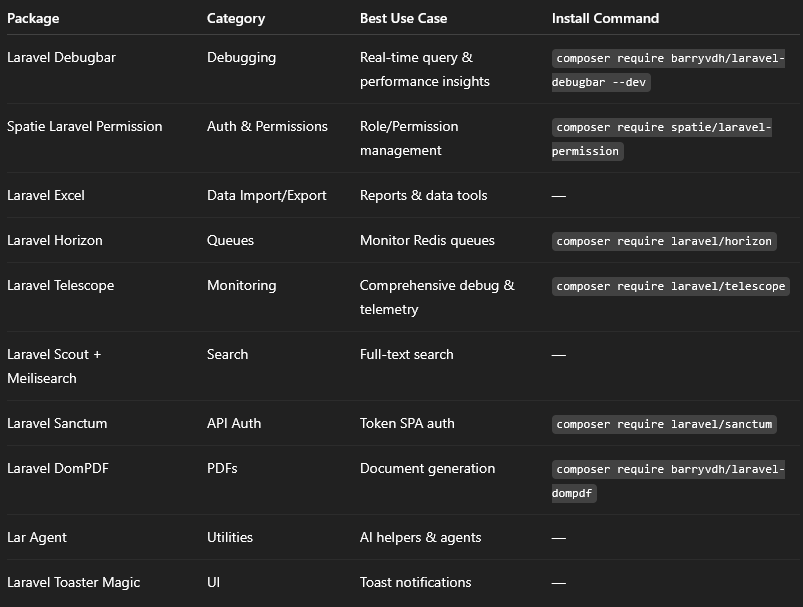
Quick Comparison: Top Laravel Packagesimage.png41.03 KBHow to Choose the Right Packages
Match Features to Needs – Pick packages that solve specific problems (auth, search, debugging).
Check Compatibility – Ensure the package supports your Laravel version (most on Laravel Package Ocean support recent releases).
Review Maintenance – Prefer actively maintained packages with good docs and community support.
Test First – Try in development before adding to production.
Conclusion
Laravel’s ecosystem thrives because of its vibrant package community. Whether you’re building an API, an e-commerce site, or an admin dashboard, there are solutions that help you code faster, maintain quality, and focus on business logic instead of reinventing solutions.
Laravel Package Ocean is a great starting point to discover tools that fit your workflow — and this curated list highlights some of the best in common use cases for modern development.