Choosing the right PHP editor can make a big difference in productivity, debugging, and overall development speed. With so many options available, we tested some of the most popular editors to help you decide which one fits your needs.
1. PhpStorm
- Pros: Advanced debugging, smart code completion, built-in tools for frameworks like Laravel and Symfony, strong refactoring support.
- Cons: Paid license (though students get it free).
- Best for: Professional developers and teams working on large projects.
2. Visual Studio Code (VS Code)
- Pros: Free, lightweight, tons of extensions (PHP Intelephense, Laravel Artisan), Git integration, cross-platform.
- Cons: Requires setup with extensions for full PHP support.
- Best for: Developers who want flexibility and a free solution.
3. Sublime Text
- Pros: Super fast, distraction-free interface, customizable with plugins, cross-platform.
- Cons: Limited built-in PHP support, paid license for continued use.
- Best for: Developers who prefer speed and minimalism.
4. NetBeans
- Pros: Free, open-source, built-in support for PHP frameworks, strong debugging and version control features.
- Cons: Slower than lighter editors, heavier UI.
- Best for: Developers looking for a free, all-in-one IDE.
5. Eclipse PDT (PHP Development Tools)
- Pros: Open-source, robust debugging tools, supports large projects.
- Cons: Heavy and slower compared to other editors.
- Best for: Enterprise-level projects where Eclipse is already used.
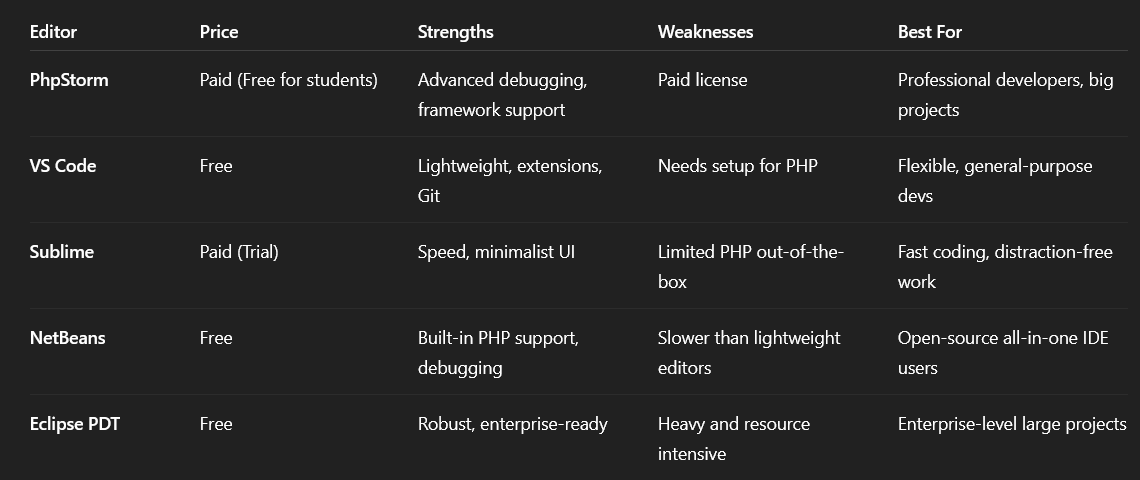
Recap Table: Best PHP Editors
Conclusion
There is no single “best” PHP editor—it depends on your needs. If you want advanced tools, PhpStorm is the gold standard. For a free, flexible option, VS Code is excellent. If speed is your priority, go with Sublime, while NetBeans and Eclipse PDT remain strong choices for developers who prefer full-featured IDEs.